
- Home
- Home
- Mining and construction simulators
- Training Systems
- Port simulators
- Training Systems
- Industrial simulators
- Training Systems
- Gallery
- Training Systems
- Hardware Components
- Hardware
- Simulator Models
- Hardware
- Why Simulators?
- Hardware
- Technical information
- Software
- Our Solutions
- Software
- Instructor Information
- Software
- Collaborative Mode
- Software
- Services
- Services
- Ship-to-Shore Crane Simulator
- Bulldozer Simulator
- Mobile Harbour Crane Simulator
- Mining Truck Simulator
- Wheel Loader Simulator
- Underground LHD Loader Simulator
- Forklift Simulator
- High Capacity Forklift Simulator
- 360 Excavator Simulator
- Mobile Crane Simulator
- Rail Mounted Gantry Crane Simulator
- Tower Crane Simulator
- Rubber-Tyred Gantry Crane Simulator
- Telehandler Simulator
- Grader Simulator
- Reach-Stacker Simulator
- Backhoe Simulator
- Ro-Ro Simulator
- Straddle Carrier Simulator
- WheelDozer Simulator
- Articulated Mining Truck Simulator
- Electric Shovel Simulator
- Empty Container Handler Simulator
- Drilling Jumbo Simulator
- Bridge Crane Simulator
- Farming Tractor Simulator
- Harvester Simulator
- Ship Pedestal Crane Simulator
- Mobile Elevating Work Platform (MEWP) Simulator
- About us
- About us
- Our Learning Methodology
- About us
- Contact
- Contact

A Mobile Elevating Work Platform (MEWP) is a machine widely used in construction, maintenance, and industry. It is a mobile device designed to lift people to a working position at height.
Depending on the task, there are different types such as scissor lifts (for vertical elevation), articulated booms (to overcome obstacles), or telescopic booms (to reach great heights and distances).
The most common application is to provide safe access for workers and their tools to elevated or hard-to-reach places, offering a safer and more efficient alternative to traditional methods such as scaffolding or ladders. For example, MEWPs are essential for facade maintenance, structure assembly, repairs, or inspections. These tasks would otherwise require complex and time-consuming setups.
Basically, it consists of a chassis serving as the base, an extendable structure (scissor, articulated arm, or telescopic), and a working platform or basket where operators are positioned, equipped with its own control systems.
Why use the Aerial Work Platform simulator?
Through the use of simulators, operators can acquire the skills and knowledge needed to avoid or properly react to risk situations. Training with simulators allows practice in a safe and controlled environment, preparing workers to face dangers such as:
- Collisions of the platform or operator against fixed or moving objects.
- Entrapment of the operator between the platform and external structures such as ceilings or beams.
- Overturning of the equipment due to incorrect use, overload, or operation on unstable ground.
- Falling materials or tools onto people or property.
- Others: such as fires or explosions caused by poor maintenance or hydraulic system failures.
In addition, a key advantage of the simulator is that it allows the recreation and handling of high-risk situations, such as machine overturning or mechanical failure, which are impossible to train safely with real equipment.


Equipment
- Ergonomic cabin equipped with real controls: joysticks, buttons, and an emergency stop button with authentic haptic feedback.
- The cabin is mounted on a motion platform, with between 2 and 6 degrees of freedom, reproducing accelerations, tilts, and vibrations.
- Real operations console for a true control experience.
- Independent instructor console with full simulation control: scenario selection, fault injection, monitoring, and metrics logging.
Visualization system
- Implementation of shaders to provide higher graphic excellence.
- External views showing machine parameters.
- Multiple cameras allowing the user to change the viewpoint.
- HUD with warning indicators.
- High-quality shadows.
- Surround projection system using 2 to 5 high-resolution screens, offering front, side, and panoramic views depending on configuration.
- Realistic 3D graphics, with detailed textures and typical environments: construction site, warehouse, uneven ground, day/night lighting.
Special conditions
- Ability to work at different times of day: sunrise, morning, afternoon, dusk, night.
- Weather conditions: wind, rain, fog, etc.
- Realistic response to collisions depending on severity.
- Environmental conditions: smoke, dust, etc.
Main features
- Development of an immersive environment based on "Virtual Reality," analogous to the real-world conditions of a quarry worksite.
- Dynamic terrain.
- Delayed braking system.
- Realistic machine startup and shutdown sequence.
- Accurately simulated vehicle transmission.
- Simulation of automatic and manual gearboxes.
- Simulation of all joints and hydraulic pistons of the machine.
- Main accelerations and movements perceived inside the cabin.
- Machine response according to load.
- Instructor-injected faults in real time.
- Collaborative mode: multiple users can interact with each other.
- Avatars.
- Auxiliary window with information on status, position, and machine operation commands.
- On-screen information for both user and instructor.
- Multi-language support.
- Fully configurable sensors.
- Online system for reporting failures or client feedback.
- Theoretical training module.
- Softpanel allowing machine and attachment control through the PC mouse.
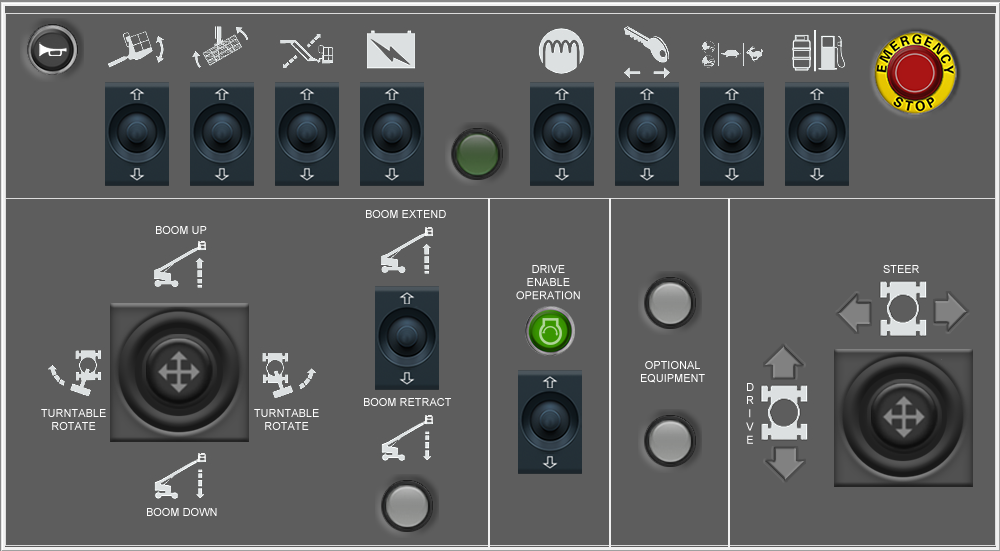
The aerial work platform simulator developed by the LSyM group incorporates a detailed instructional design divided into blocks, each including a series of exercises that progressively increase in difficulty as the student completes them.
Instructional design
- Quiz exercises.
- Control verification: Interactive tutorial with labels on each component to ensure correct functioning.
- Pre-start checklist: The user selects what must be checked before starting. Penalty if faults are overlooked.
- Basic maneuvers: Simple circuit: raise, lower, and move safely.
- Advanced maneuvers: Circuit with obstacles, slopes, and confined spaces.
- Emergencies: Random events such as battery failure, emergency stop, sudden wind…
- Parking: Correct procedure before leaving the machine.
Reports and evaluation
- Session start and end.
- Date.
- Session duration.
- Completed exercises.
- Collision log.
- Speed log.
- Control usage log.
- Dangerous maneuvers log.